Importing Addresses to Your NRGship Address Book
If you previously used Worldship or UPS.com to manage your shipping, NRG allows you to import your address book detail using built in scripts to make it simple.
IMPORTING UPS ADDRESS BOOKS
Review the instructions on how to export your address book from UPS WorldShip or UPS.com and export the files. If you have a file of existing addresses, you can also import them by selecting "Other" as an import option. Once you have the files available, follow these steps:
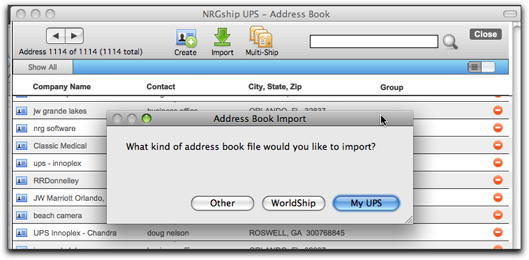
->Step 1: Click on the "Import" Icon and select your file format
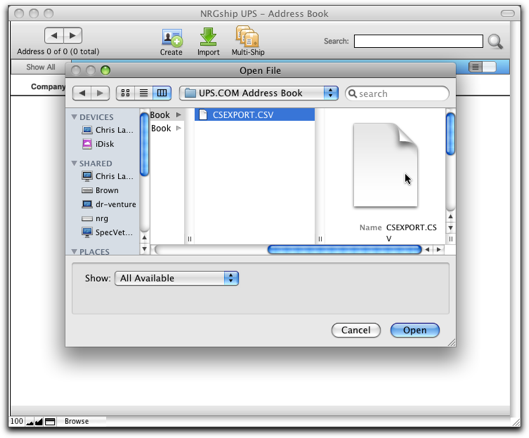
->Step 2: Locate your file and click "Open"
->Step 3: Import Field Mapping
UPS.com and Worldship Imports, simply click "Import". If using "Other" file option, follow the instructions to align your data to the address book format.
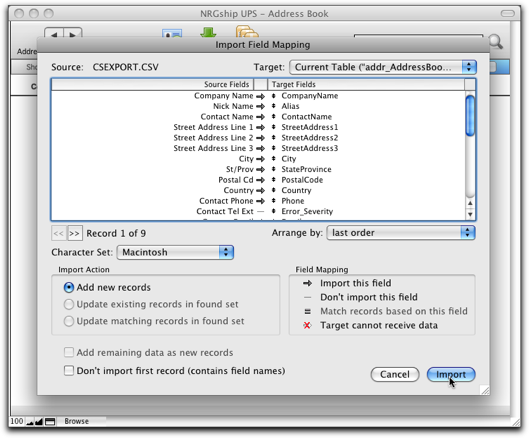
-> Step 4: Another dialog will come up as shown, click "Import" again

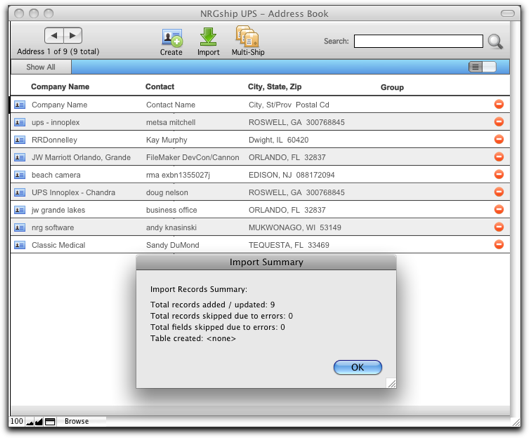
-> Step 5: Accept Import Results
Your import results will be shown. You will be able to see your addresses in the list view. Click "OK" to accept the import.
UPS ADDRESS EXPORTS
You can export address books from UPS.com and Worldship. Please refer to the instructions below. We've also provided sample files of what they should look like when your export is completed.
Worldship
MyUPS
